![logo.png]](https://knowledgebase.connectwithodin.com/hs-fs/hubfs/logo.png?height=40&name=logo.png)
You must be a Site Admin in order to create another Site Admin or Site User. When you click the Add User button from the Site Users page, you will get a Create Site User popup as shown in the figure below.
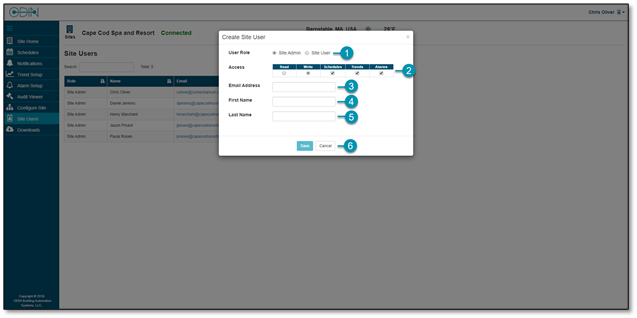
- User Role: Choose from Site Admin or Site User for the new user. Site Admins will have access to all pages within ODIN while Site Users will have access to only the Site Home, Schedules, and Notifications pages.
- Access: Choose the level of access to give the user. Read will give them read only rights without the ability to make changes in the system. Write will give the user full rights to the pages they have access to based on their user role. You can also check or uncheck the features they will have access to.
- Email Address: Enter the email address to be used as their username. If the email address belongs to an existing ODIN user, the first and last name will populate for you. You can then click Save to add this existing user to your ODIN site.
- First Name: Enter the first name of the user to be created.
- Last Name: Enter the last name of the user to be created.
- Save and Cancel: Click to save or cancel your configuration. Saving will send the new user an email with an activation link and temporary password.
Note: If the user does not receive their activation email, please check the spam folder.